Understand automations in 3 minutes
No programming needed. An automation is a rule you write once and Handler applies on its own, even when nobody on your team is online.
The idea in one sentence
An automation says: when something happens, if a condition is true, then do an action. For example: when a player joins, if it is their first visit, send them a welcome message.
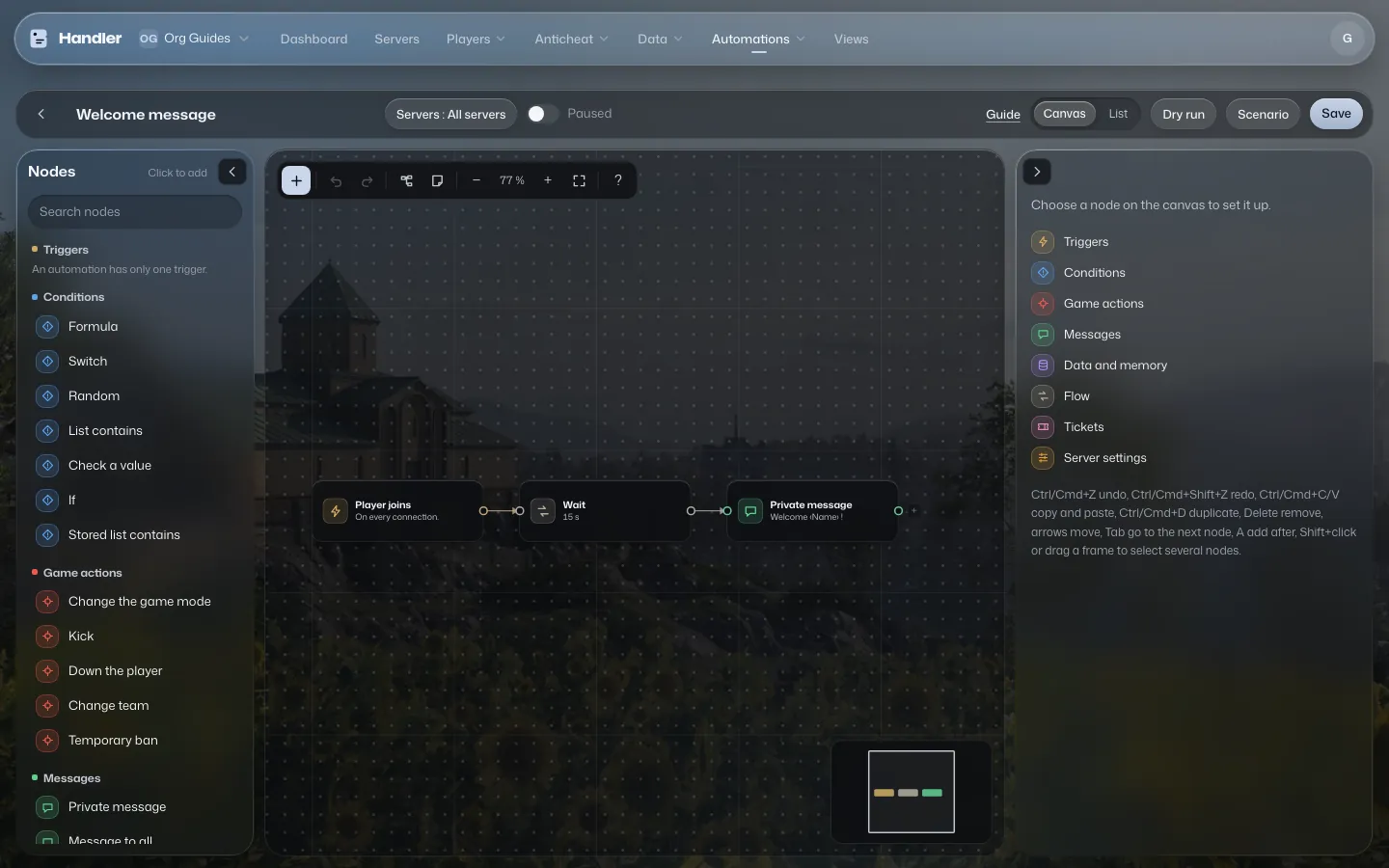
Solid arrows show the order things happen in. Dashed arrows show the memory, which any step can read or fill.
The four pieces
1. The trigger: what starts the automation
Each automation has exactly one. Examples: Player joins, Player leaves, Kill, Match start, Schedule (every N seconds). Without a trigger, nothing starts.
2. Conditions: sorting what deserves a reaction
The If step asks a question about a piece of data: “is it the player's first visit?”, “is their ping above 250?”. It has two outputs, true and false. You link what comes next to the output you care about. An output with no link does nothing.
3. Actions: what Handler does
Private message, Message to all, Kick, Temporary ban, Down the player, Change team… A kill in Wardogs downs the player: an ally can still revive them. The Down the player action does the same, it does not send the player back to spawn.
4. Memory: remembering things
An automation can keep information from one run to the next: a per-player infraction counter, a list of players already welcomed, a team's score. You choose who owns it (a player, the server, the organization) and how long it lasts (until the end of the match, a few hours, forever). Everything stored can be viewed and fixed in the Memory page.
What it looks like on screen
The editor is called the canvas. Each step is a card (also called a node), and wires link the cards in order. Colors show the family: triggers, conditions, in-game actions, messages, memory. On a small screen, the automation shows as a List instead, with the same settings.
What is built in so nothing breaks
- A new automation is Paused: it does nothing until you flip the Active switch.
- An official example, an imported file or an added pack always arrives switched off.
- An automation acts on behalf of the organization: you can only put in actions your role allows.
- You can try it without sending anything to the game, with the dry run and the scenario simulator (see the “Test safely” guide).
The vocabulary at a glance
| Word | It means |
|---|---|
| Automation | A complete rule: a trigger, steps and actions. |
| Trigger | What starts it (a player joins, a kill, a time…). |
| Node or step | A card on the canvas. |
| Canvas | The screen where you place and link cards. |
| Data | A piece of information available at a step: name, ping, weapon, map… |
| Memory | What the automation remembers between two runs. |
| Dry run | A quick test with a made-up player, sending nothing to the game. |
| Scenario | A whole made-up match, played against the automation. |
| Pack | A group of automations with a few simple settings to fill in. |